

Roofing Proposal Software for Faster, More Professional Job Approvals
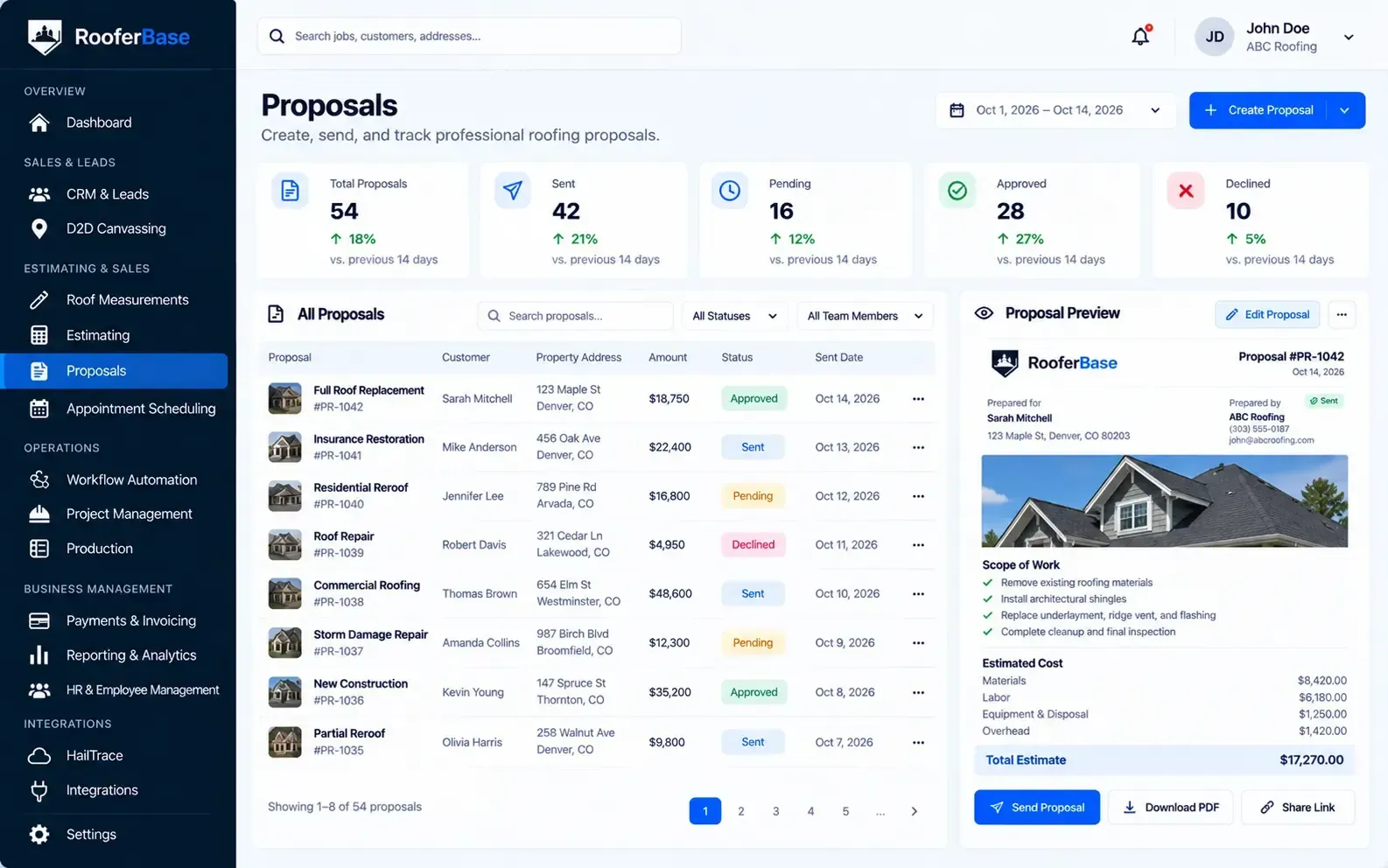

Create clear, branded roofing proposals from your project information, send them digitally, track customer activity, and move approved jobs into the next stage of your workflow.
RooferBase keeps proposal details connected to the customer, property, estimate, and sales opportunity, so your team does not have to rebuild the same information in a separate document or proposal tool.
Manage your proposal process with:
01
02
03
04
05
06
Build branded roofing proposals from customer and project information.
Present scope, materials, pricing, options, and project details clearly.
Create proposal templates for consistent sales presentations.
Send proposals digitally for customer review and approval.
Track proposal status, responses, revisions, and next actions.
Move approved proposals into the signed-job or production workflow.
02 - Definition
What Is Roofing Proposal Software?
Roofing proposal software is a digital tool that helps roofing contractors prepare, customize, send, track, and approve customer-facing proposals for roofing projects. It brings project information, scope of work, materials, pricing, options, terms, and customer approval into a structured proposal workflow.
03 - Connected proposal details
Why Roofing Proposals Need More Than a Word Document
A roofing proposal must communicate more than a total price. It may need to explain the property, scope of work, roofing materials, exclusions, warranties, payment terms, project expectations, financing, and next steps.
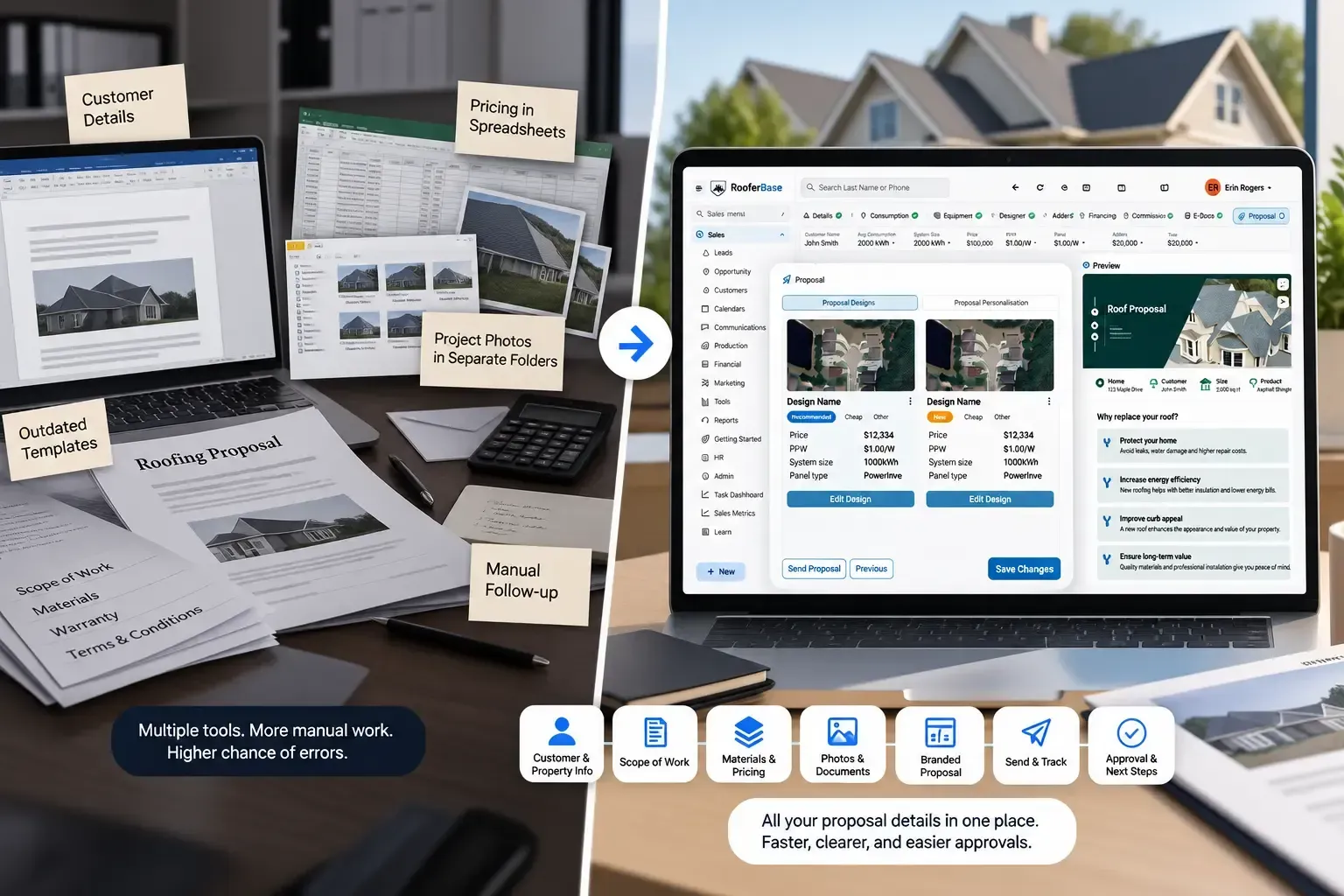
Documents created manually in Word, Google Docs, spreadsheets, or PDF editors often create problems such as:
01
02
03
04
05
06
07
08
Re-entered customer and property information.
Inconsistent pricing or scope descriptions.
Outdated proposal templates.
Missing project photos or supporting documents.
Unclear material or warranty details.
Slow editing when the scope changes.
Manual follow-up after the proposal is sent.
No clear record of whether the customer reviewed or approved it.
RooferBase organizes these details in a proposal workflow connected to the relevant customer, estimate, and sales opportunity.

04 - Complete Roofing Proposal Workflow
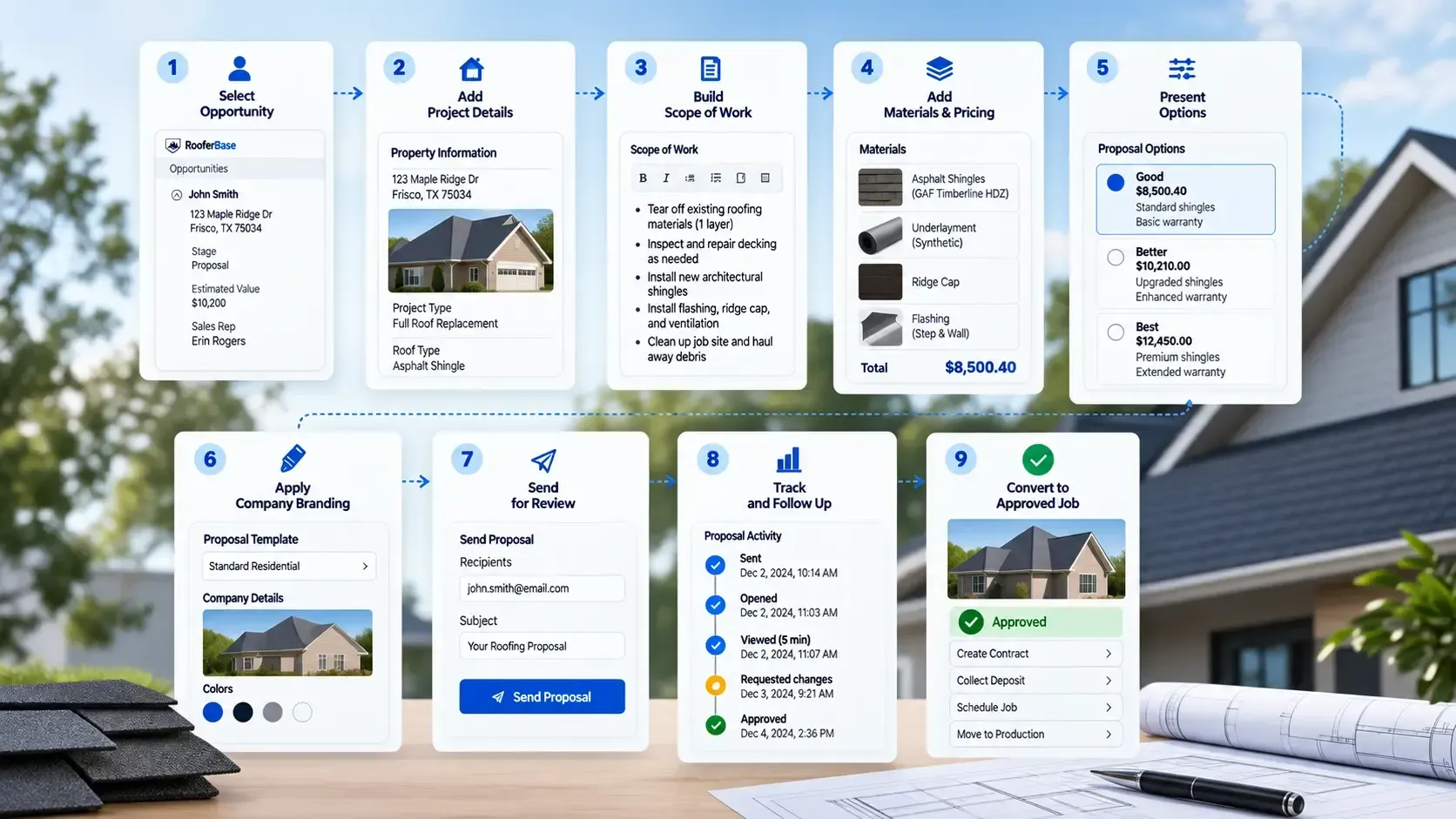
Move From Estimate to Approved Roofing Job
01
02
03
04
05
06
07
08
09
Select the opportunity
Pull the relevant customer, property, inspection, and estimate information into the proposal workflow.
Add project details
Include available roof measurement data from sources such as Google Maps imagery or EagleView measurement reports, alongside inspection notes, photos, and other supporting project information.
Build the scope of work
Organize the work into clear line items and customer-friendly descriptions. Define what the project includes and identify exclusions or conditions.
Add materials and pricing
Add selected materials, labor, pricing, payment terms, financing information, and applicable taxes or fees according to the project requirements.
Present options
Offer different material packages, upgrades, or service levels where supported. Make the differences between options easy for the customer to understand.
Apply company branding
Use approved branding, templates, terms, warranties, contact information, and supporting content to maintain a consistent customer experience.
Send for review
Deliver the proposal digitally and give the customer a clear way to review the scope, pricing, terms, and next steps.
Track and follow up
Monitor proposal activity, customer questions, revisions, and approval status. Create follow-up tasks and reminders when a proposal needs a response or next action.
Convert the approved proposal
Move the approved or signed proposal into the next stage, such as contract completion, deposit collection, scheduling, or production handoff.
05 - What You Can Manage With RooferBase Roofing Proposal Software
Build Professional Roofing Proposals
Create customer-ready proposals from organized project information
RooferBase helps sales teams create consistent roofing proposals using the customer, property, inspection, and estimate information already associated with the opportunity.
- Use reusable roofing proposal templates.
- Apply company branding, terms, and contact information.
- Present scope of work in clear, customer-friendly language.
- Include materials, pricing, warranties, exclusions, and project details.
- Add relevant project photos and supporting documents.
- Update proposal details when the scope or project requirements change.
Sales representatives spend less time rebuilding proposal documents and more time explaining the project and moving the customer toward approval.
06 - Know what happens after the proposal leaves your sales team
Track Proposal Engagement
Sending a proposal does not mean the sales process is finished. RooferBase keeps proposal activity connected to the opportunity so representatives can see what needs attention.
RooferBase helps teams:
01
02
03
04
Track proposals that have been sent.
Monitor customer views or activity where supported.
Record customer questions and requested changes.
Manage proposal revisions and updated versions.
05
06
07
Create follow-up tasks and reminders.
Track approval or signature status where supported.
Identify proposals that are waiting for a customer response.
Sales representatives know which proposals need action, while managers can identify stalled opportunities before they disappear from the pipeline.
07 - Make materials, upgrades, and pricing easier for customers to compare
Present Multiple Roofing Options
Roofing customers may need to compare different materials, warranties, upgrades, or service levels before approving a project. RooferBase lets teams present those choices within a structured proposal.
- Present Good, Better, and Best options.
- Show different material packages or upgrades.
- Separate scope and pricing by option.
- Include financing or payment information where supported.
- Clearly show differences between options.
Customers can compare roofing options without sorting through separate quotes, while sales representatives can guide the conversation around value rather than price alone.
08 - CRM → Proposal Connection
Start Proposals With the Information Sales Already Collected
RooferBase connects proposal creation to the customer and sales opportunity record. This allows relevant information collected during lead management, inspection, and estimating to be referenced when preparing the proposal.
Information includes:
- Customer and property information.
- Inspection notes and project requirements.
- Roof measurements and estimate details.
- Photos and supporting documents.
- Selected materials and project scope.
- Pricing, payment, or financing information.
- Sales notes and relevant customer activity.
- Roof measurements and measurement reports from sources such as Google Maps imagery and EagleView, where available.
This keeps the proposal connected to the same opportunity instead of creating a separate record that sales teams have to maintain manually.
09 - Proposal → Production Handoff
Move Approved Proposals Into the Next Roofing Workflow
Winning the job shouldn't mean starting the job record over again. When a proposal is approved, RooferBase keeps the relevant sales and project information connected as the job moves into the next workflow.
The handoff includes:
- Customer and property information.
- Approved scope of work.
- Selected materials and options.
- Final pricing and payment terms.
- Inspection information, photos, and documents.
- Customer requirements and sales commitments.
- Approved proposal or signed agreement.
The production team can use the approved scope, selected materials, pricing, and documented customer commitments as the starting point for job planning. This helps the team prepare for execution without having to reconstruct the agreement reached during sales.
10 - Proposal comparison
RooferBase Proposal Software vs. Manual Proposal Tools
| Manual documents and spreadsheets | RooferBase Proposal Software |
|---|---|
| Customer details are copied manually | Customer and project information connects to the opportunity |
| Each representative may use a different format | Teams work from approved templates |
| Pricing and scope require repeated editing | Structured proposal sections organize the information |
| Proposal status is tracked in email or spreadsheets | Proposal activity remains visible in the sales workflow |
| Follow-up depends on individual memory | Follow-up tasks and reminders support the process |
| Approved documents require manual handoff | Approved project information connects to the next workflow |
| Version history is difficult to manage | Proposal revisions remain associated with the opportunity, if supported |
11 - In practice
How Roofing Teams Use RooferBase Proposal Software
Residential roof replacement
A sales representative completes the inspection and estimate. RooferBase uses the available customer and project information to create a branded proposal with scope, materials, pricing, warranty details, and approval steps.
Good, Better, Best presentation
A contractor presents three material or service options. Each option includes its own scope and price, helping the homeowner compare choices within one proposal.
Commercial roofing bid
A commercial proposal includes multiple contacts, property information, technical documents, scope details, exclusions, pricing, and approval requirements. The proposal record keeps these details organized while the customer reviews the bid.
Proposal revision
Send proposals for digital signatures and let customers approve them from any device.
A customer requests a change to materials or scope. The sales representative updates the proposal, records the revision, and sends the revised version for review.
12 - Integrations and Configuration
Connect Proposal Software With Your Roofing Tools
RooferBase proposal workflows with supported systems for:
CRM and lead management.
Roofing estimation and measurement.
Email and SMS.
Digital signatures.
Financing and payments.
Document storage.
Project management.
Accounting and reporting.