


Roofing CRM Software for the Complete Lead-to-Sale Workflow
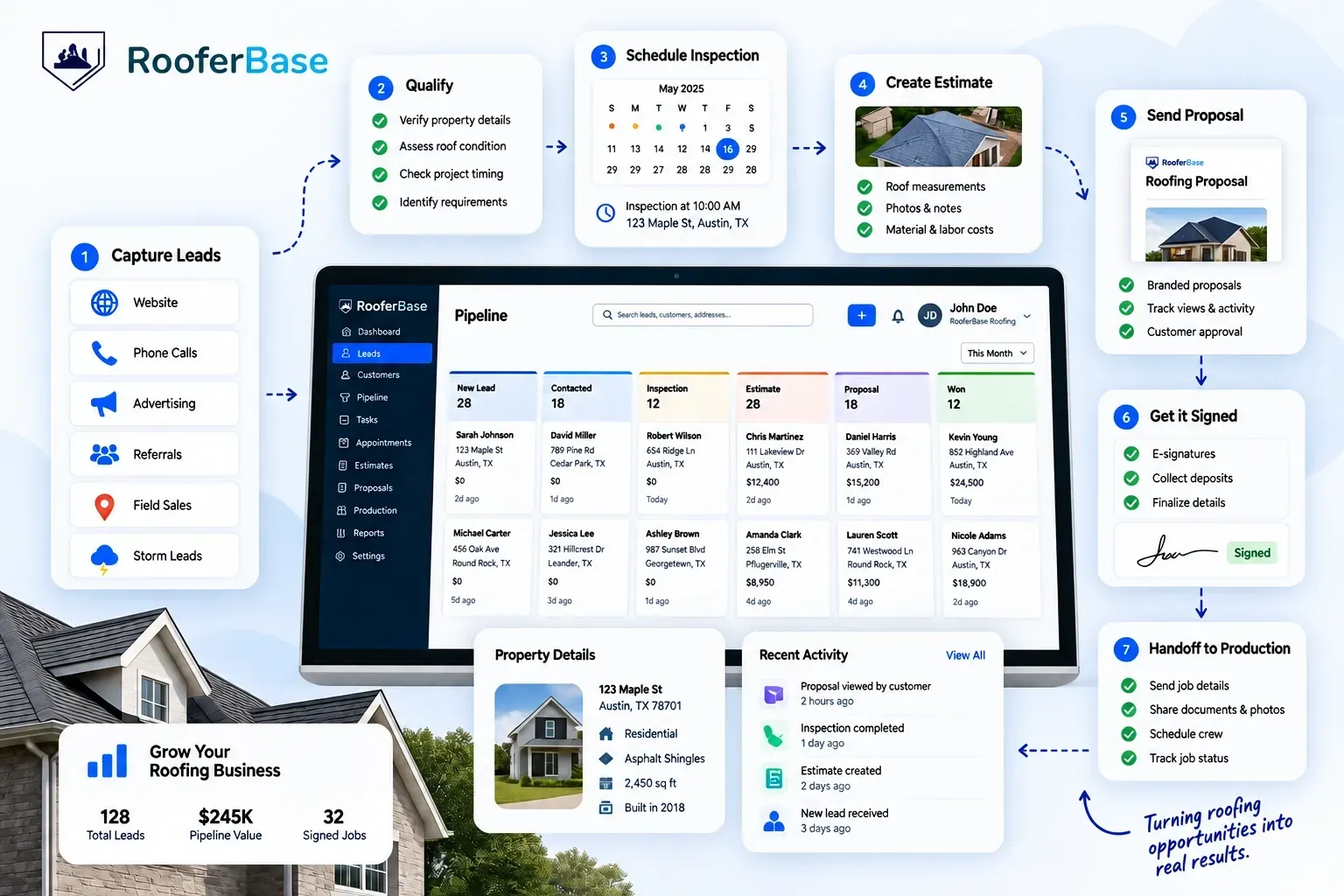
Manage roofing leads, customer relationships, inspections, follow-ups, estimates, proposals, and sales activity from one CRM built around how roofing companies sell.
RooferBase connects your sales process from the first enquiry through inspection, proposal approval, signed contract, and production handoff—so your team works from one complete customer record instead of scattered tools.
Your roofing sales process managed with:
01
02
03
04
05
06
Lead capture from websites, phone calls, advertising, referrals, and field sales.
Roofing-specific pipeline stages for inspections, estimates, proposals, and signed jobs.
Roofing-specific pipeline stages for inspections, estimates, proposals, and signed jobs.
Roofing-specific pipeline stages for inspections, estimates, proposals, and signed jobs.
Roofing-specific pipeline stages for inspections, estimates, proposals, and signed jobs.
Roofing-specific pipeline stages for inspections, estimates, proposals, and signed jobs.
02 - Definition
What Is Roofing CRM Software?
A single roofing opportunity can carry information your sales team needs at every stage of the job:
Roofing CRM software is a customer and sales management system built around the way roofing contractors sell, from capturing a roofing lead and scheduling the inspection to managing roof information, estimates, proposals, and the handoff after a job is signed.
Unlike a general CRM, which primarily tracks contacts and deals, the difference is that a roofing opportunity carries more than contact and deal information: it can include the property, roof condition, inspection findings, measurements, photos, pricing, proposal activity, and information needed when the job moves into production.
RooferBase CRM connects these sales activities so roofing teams can manage an opportunity from first contact through a signed job and handoff to production.
03 - Depth of the record
Why Roofing Companies Need More Than a Standard CRM
A roofing sale involves more than a contact and a deal. Your team needs the property, roof details, inspection findings, photos, measurements, pricing, and proposal history alongside the customer record.
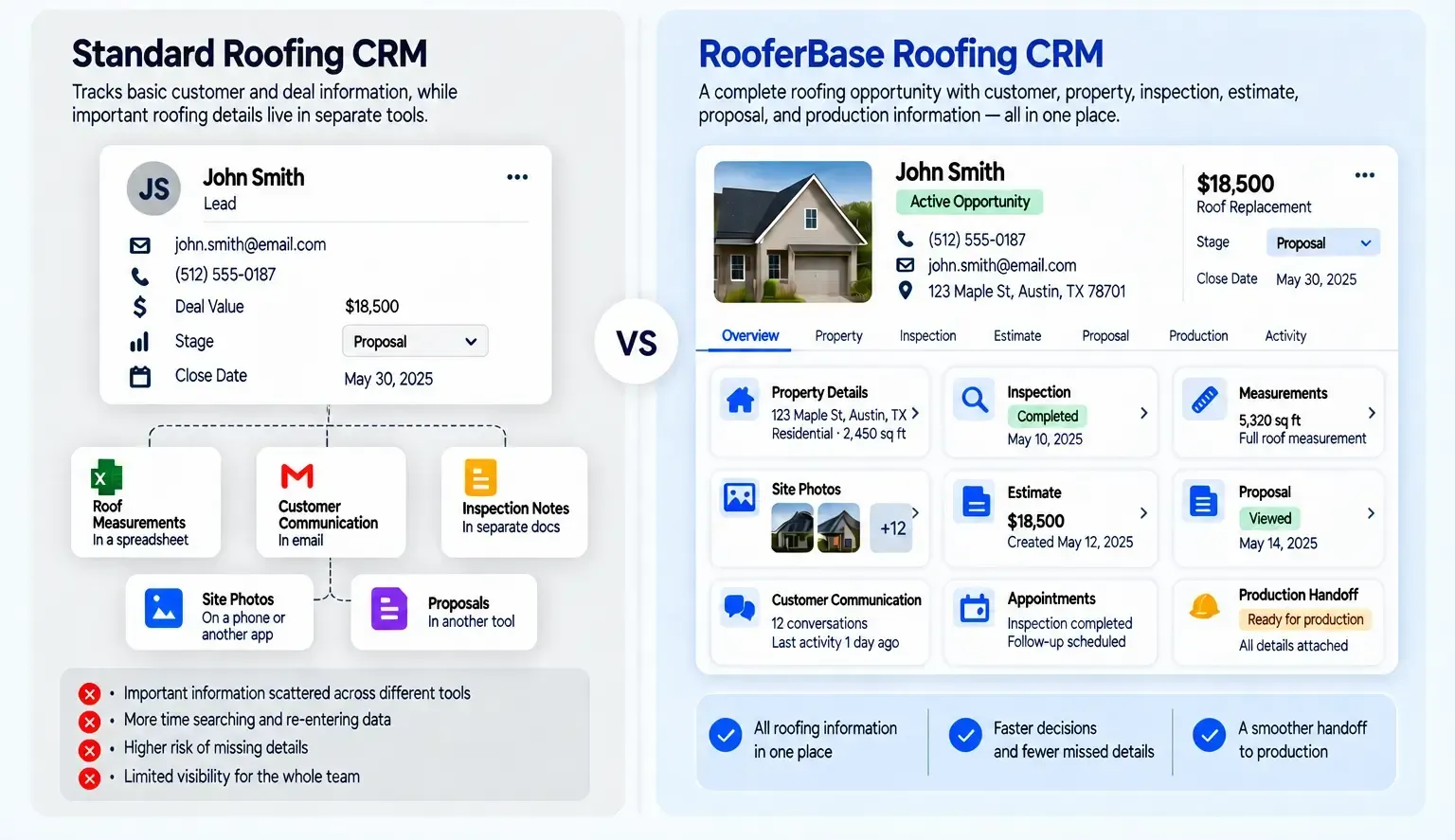
A single roofing opportunity can carry information your sales team needs at every stage of the job:
01
02
03
04
05
06
07
08
Property and homeowner information.
Roof condition, measurements, and inspection notes.
Site photos and supporting documents.
Appointment history and sales representative activity.
Estimate requests and pricing status.
Proposal delivery, customer responses, and approvals.
Financing, insurance, or project requirements.
Information required for production handoff.
If those details are spread across spreadsheets, inboxes, messages, and separate tools, reps have to hunt for information and enter the same details more than once.
RooferBase is designed around the sales process roofing teams manage every day, from lead capture and field sales through inspection, estimating, proposals, and signed-job handoff. The workflow reflects the information roofing teams need to keep connected across a customer opportunity, rather than treating roofing as a generic sales pipeline.

04 - Lead to assigned job
What RooferBase CRM Does From Lead to Signed Job
Give your sales team a clear workflow for managing every customer opportunity.
01
02
03
04
05
06
07
Capture the Lead
Capture roofing opportunities from homeowner enquiries, storm-generated opportunities, referrals, advertising, partner channels, and door-to-door sales. Record the original lead source so your team can track which channels generate opportunities and signed jobs.
Assign & Track Opportunity
Route each lead to the right sales representative based on territory, location, lead source, or team assignment. Managers can monitor ownership and prevent unassigned leads from being overlooked when demand spikes.
Qualify the Roofing Opportunity
Record the customer’s requirements, property details, project timing, budget considerations, and other qualification information. Move suitable opportunities into the inspection stage.
Schedule the inspection
Schedule roof inspections, consultations, and follow-up appointments directly from the opportunity, with the relevant property and sales information available to the team before each appointment.
Track the estimate
Move from inspection to estimate without losing the information collected in the field. Keep inspection notes, roof measurements, photos, documents, and pricing status connected to the opportunity as the estimate is prepared and reviewed.
Manage the proposal
Track proposal preparation, delivery, revisions, customer questions, and approval status after the inspection and estimate are complete without losing the wider sales history attached to the opportunity.
Close and hand off the job
When the customer approves the proposal, move the opportunity into the next roofing workflow with the relevant customer, property, scope, and document information attached.
05 - How does RooferBase organize roofing leads and customer records
Roofing Lead and Customer Management
RooferBase gives your team a structured record for every roofing opportunity, whether it comes from a website form, referral, phone call, advertisement, or field representative.
Your team can:
- Capture the lead source and original enquiry.
- Assign ownership to a sales representative.
- Record customer and property details.
- Add inspection notes, photos, and documents.
- Track calls, messages, emails, and internal notes.
- View the opportunity's current stage and next action.
- Review the complete history before contacting the customer.
- Identify incomplete records before moving the opportunity forward.
A complete customer record helps sales representatives act faster and gives managers a reliable view of pipeline activity.
06 - How do Roofers know where every opportunity stands
Roofing Sales Pipeline Management
A roofing sales pipeline should show more than the number of open deals. It should help your team understand which opportunities need a call, an inspection, an estimate, a proposal follow-up, or attention from a sales manager.
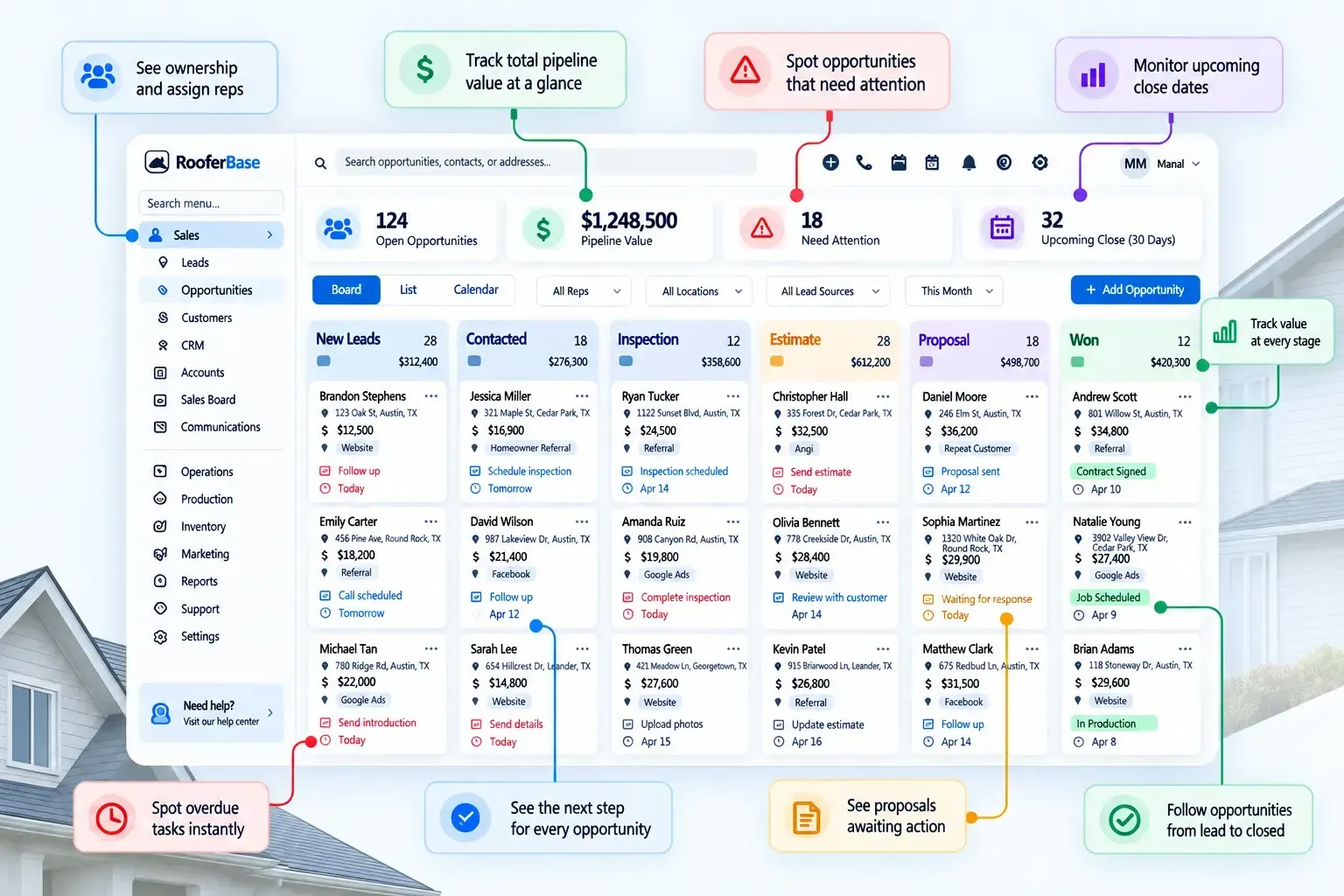
RooferBase helps teams:
01
02
03
04
Create pipeline stages around the roofing sales process.
Assign opportunities to representatives and teams.
Track expected value and potential close dates.
Identify leads with no recent activity.
05
06
07
08
Monitor estimates and proposals awaiting customer action.
Review pipeline movement by representative or location.
Compare lead sources and opportunity outcomes.
Surface overdue tasks and missed next steps.
Sales representatives see what they need to do next. Managers see where opportunities are moving, slowing down, or being lost.
07 - Roofing Follow-Up Automation
How does RooferBase prevent missed follow-ups
A lead can go cold simply because nobody followed up at the right time. They lose revenue because opportunities fall through the cracks, and roofing leads often require several interactions before a customer schedules an inspection or approves a proposal.
Where roofing opportunities can fall through:
- The storm lead that never gets assigned: A sudden increase in roofing enquiries can overwhelm a sales team if every new opportunity doesn't have a clear owner and next action.
- The inspection that never gets followed up: A roof was inspected, photos and measurements were collected, but the opportunity stalls before the estimate or proposal reaches the homeowner.
- The proposal that sits unanswered: The proposal was delivered, but no one owns the next conversation.
Set up workflow actions for:
- Assigning new roofing leads.
- Following up on missed calls or unanswered enquiries.
- Sending inspection confirmations and reminders.
- Creating post-inspection follow-up tasks.
- Tracking estimate status and required next actions.
- Creating proposal follow-up tasks.
- Re-engaging inactive opportunities.
- Escalating overdue sales activity.
Each action remains connected to the relevant opportunity, assigned owner, and activity history, so representatives know what needs to happen next and managers can see which roofing opportunities are stalled or overdue.
RooferBase helps your team maintain consistent follow-up without relying on memory or spreadsheets.
08 - Connect CRM With the Roofing Sales Workflow
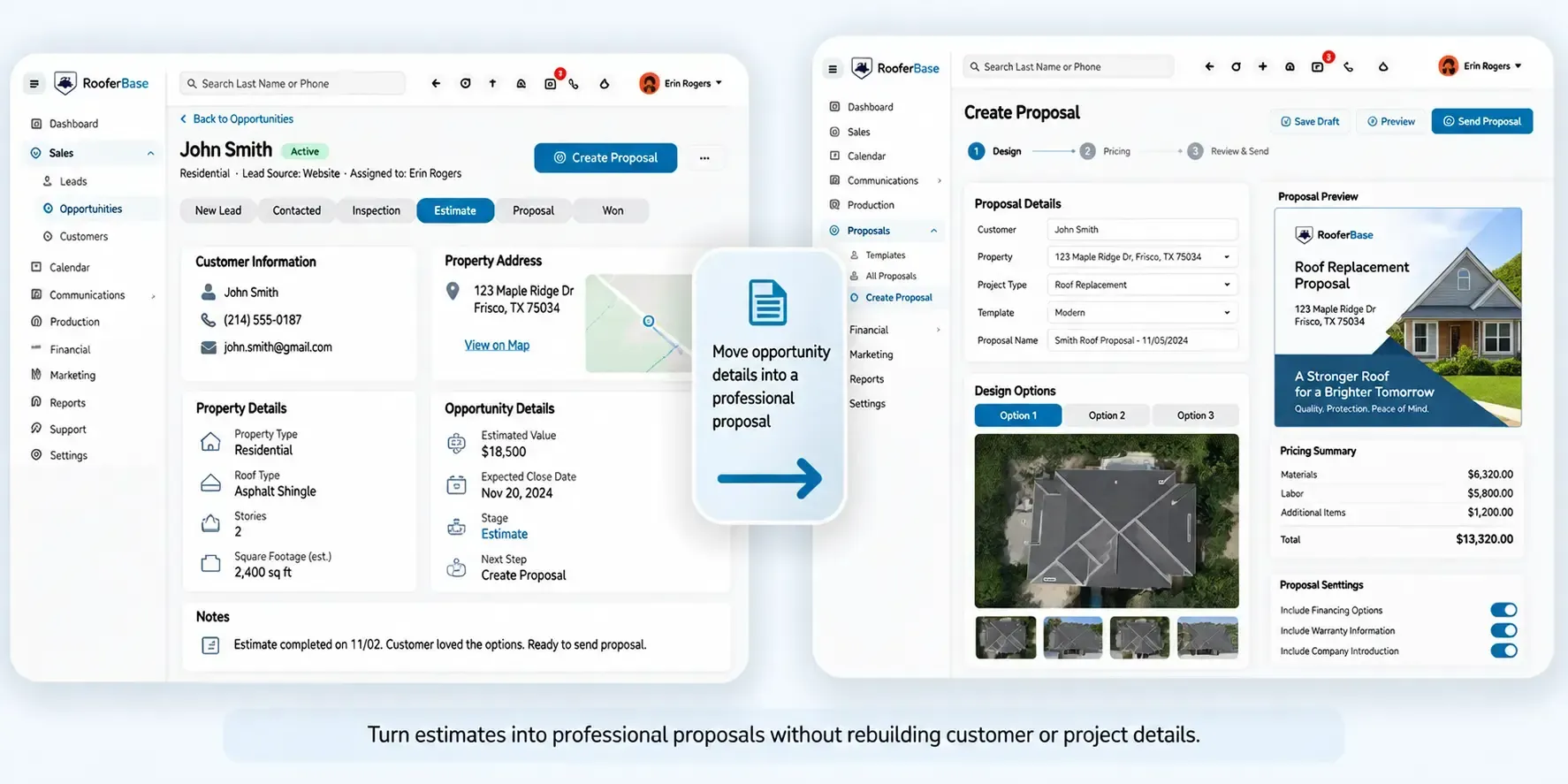
Move Information Forward Without Rebuilding the Customer Record
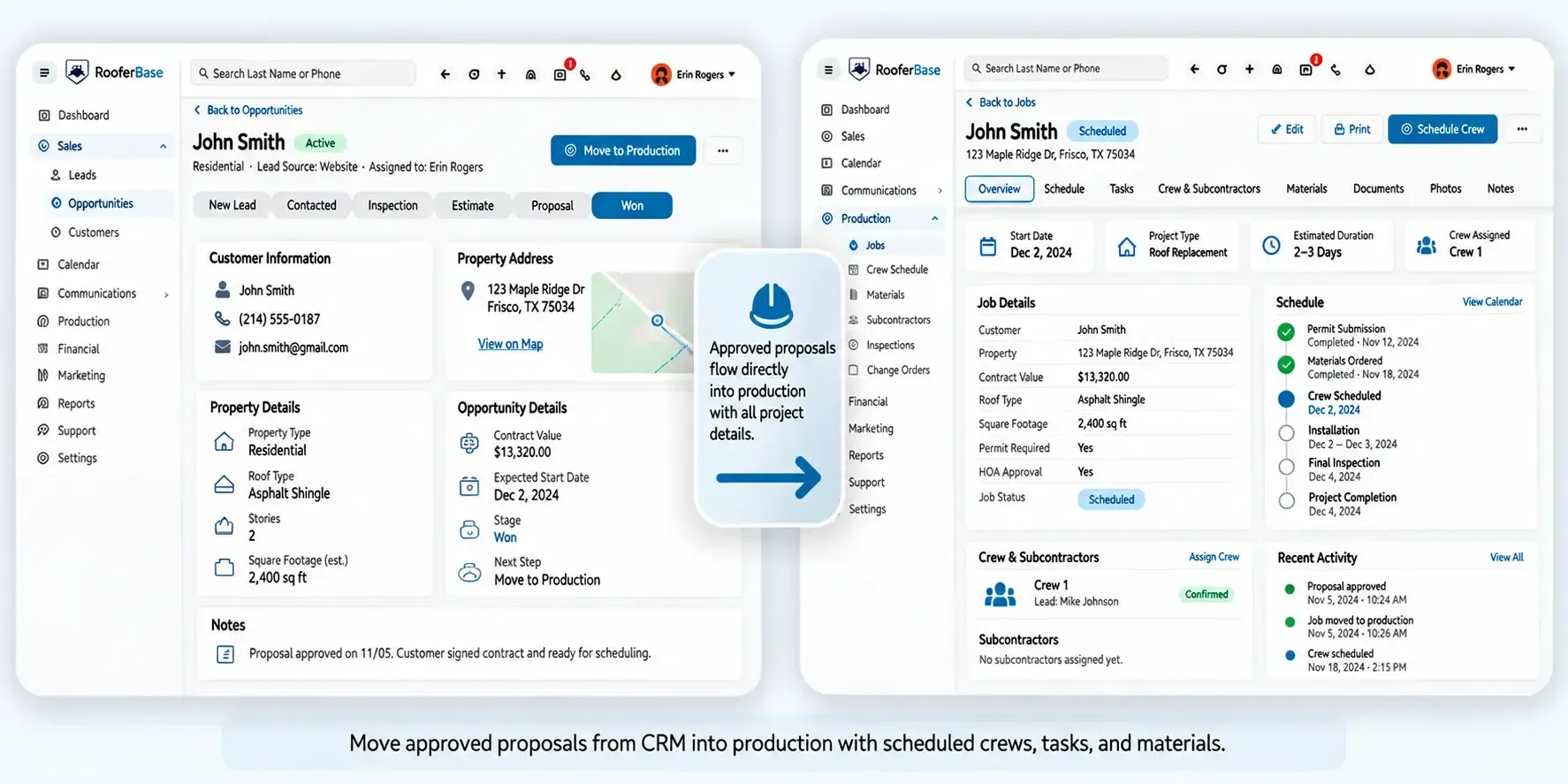
Once a customer signs, your production team shouldn't have to rebuild the job from scratch. RooferBase carries customer details, property information, inspection notes, documents, and sales commitments into the production workflow.
01
CRM to Estimation
Send customer, property, inspection, measurement, photo, and project information into the estimation workflow.

02
CRM to Proposals
Keep proposal status and customer responses visible within the sales record while the proposal workflow handles proposal creation and approval.
03
CRM to Production
Move signed opportunities into production with the relevant customer information, project scope, documents, and sales commitments attached.
09 - Team Visibility and Collaboration
Keep Every Roofing Team Aligned
01
02
03
04
05
Sales representatives
Sales managers
Office teams
Estimation teams
Production teams
View assigned opportunities, customer history, appointments, follow-up tasks, proposal activity, and next actions.
Review pipeline health, representative activity, lead response, opportunity value, and stalled deals.
Coordinate appointments, customer communication, documents, and administrative follow-up.
Access customer, property, inspection findings, measurements, photos, and project information needed to prepare accurate estimates.
Receive approved job information, project scope, documents, and sales notes during handoff.
10 - In practice
How Roofing Teams Use RooferBase Roofing CRM
Website-generated lead
A homeowner submits a roof replacement enquiry. RooferBase records the source, assigns the lead, creates the first follow-up task, and tracks the opportunity through inspection, estimate, proposal, and approval.
Qualify the customer
A sales representative records a prospect during field activity. The CRM stores the property and contact details, assigns the next action, and keeps the opportunity visible to office and management teams.
Referral opportunity
A past customer refers a new homeowner. The team records the referral source, links the new opportunity to the appropriate sales process, and measures referral performance over time.
Commercial roofing enquiry
A property manager submits a request involving multiple stakeholders and documents. RooferBase keeps contacts, communication, inspection activity, documents, and proposal progress organized within one opportunity.
11 - Roofing Business Models
A CRM for Different Roofing Business Operations
01
Residential Roofing Contractors
Manage homeowner leads, roof inspections, estimates, proposals, follow-ups, and signed-job handoffs.
Lead → inspection → estimate → proposal → close
02
Commercial Roofing Contractors
Organize multiple contacts, properties, documents, approvals, and longer sales cycles within each opportunity.
Multiple stakeholders → property → inspection → documents → proposal → approval
03
Door-to-door roofing sales teams
Capture field-generated leads, assign territories, monitor representative activity, and maintain follow-up consistency.
Rep → territory → lead → appointment → inspection → follow-up → close
04
Storm restoration
Separate teams, territories, reporting, and permissions while maintaining company-wide visibility.
Storm lead → territory → inspection → insurance documentation → estimate → proposal → follow-up
11 - Integrations and Connected Systems
Connect RooferBase With the Tools Your Team Uses
RooferBase can serve as the central customer and opportunity record while connecting with supported systems for:
Website and marketing lead capture.
Email and SMS communication.
Calendar and appointment scheduling.
Estimation and measurement workflows.
Proposal creation and approval.
Project or production management.
Accounting and payment workflows.
Reporting and custom data connections.