

Roofing Canvassing Software for Door-to-Door Sales Teams
From the doorstep to the CRM, without rebuilding the lead later.
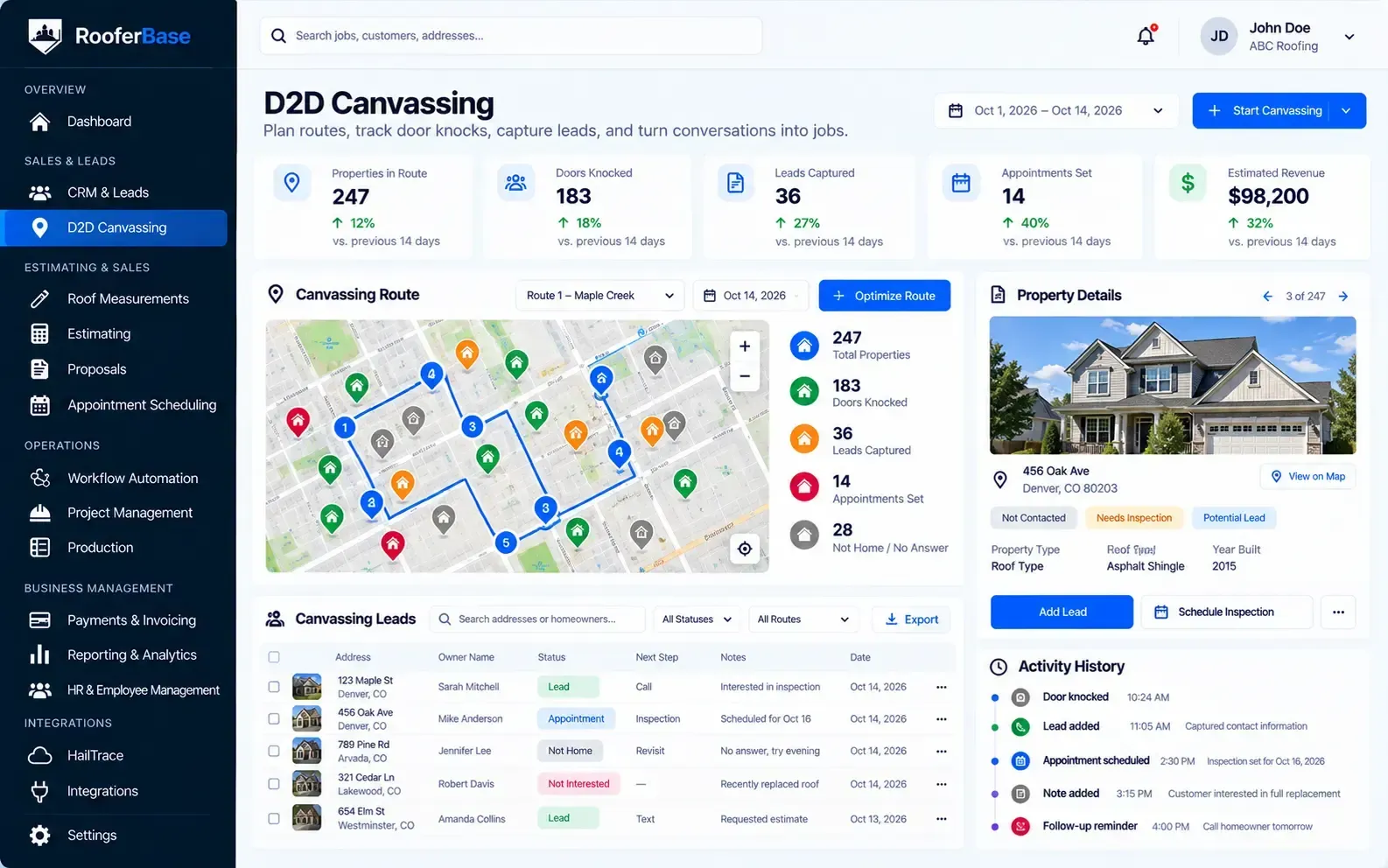

Capture door-to-door roofing leads in the field, track canvassers and territories, and move homeowners from first conversation to scheduled inspection in one connected workflow.
The roofing sales process doesn't have to start with a form, phone call, or inbound lead. It can start at the door.
RooferBase doesn't just manage D2D activity. It connects the field-generated opportunity directly into the roofing sales workflow.
01
02
03
04
Still using paper forms in the field?
Capture homeowner and property details digitally before the lead gets lost or delayed.
No visibility into rep activity?
Track where canvassers are working and how many doors they've knocked in real time.
Slow follow-ups losing deals?
Automate texts, emails, and reminders so new roofing leads receive timely follow-up after the first conversation.
Overlapping territories wasting time?
Assign neighborhoods and territories so canvassers know where to work and teams avoid duplicated coverage.
02 -Problem
Every Problem Your Field Sales Team Has, Solved in One Place
Real-time canvasser tracking, automated lead capture, territory management, and appointment scheduling to help your roofing sales team knock more doors, book more inspections, and close more jobs.
Common D2D Sales Problems:
- Lost lead information from paper forms, text messages, and memory-based note-taking.
- No visibility into which neighborhoods reps are covering or how many doors they're knocking.
- Slow follow-ups that let competitors reach homeowners first.
- Duplicate visits to the same properties wasting canvassing time.
- Missed appointments from manual scheduling and poor reminder systems.
- Unclear rep performance making it hard to coach or incentivize field teams.
RooferBase brings territory management, rep tracking, mobile lead capture, and appointment booking into one roofing canvassing workflow.

03 - Workflow
Your Roofing D2D Sales Process - Organized From First Knock to Signed Contract
Give your sales team a clear workflow for managing every customer opportunity.
01
02
03
04
05
Assign Territories & Plan Routes
Set up canvassing zones by neighborhood, storm area, ZIP code, or region and assign roofing reps before they head into the field.
Track Reps in Real Time
Monitor canvasser locations, route coverage, field activity, and uncovered areas from one dashboard.
Capture Leads On the Spot
Log homeowner details, roof condition notes, property information, and lead status directly from a mobile device while at the door.
Book Appointments Immediately
Schedule roof inspections or sales appointments on-site, with automated reminders instantly sent to homeowners.
Follow Up Automatically
Leads sync directly into the roofing CRM and trigger automated email, SMS, or call follow-up workflows.
05 - Territory and Route Management
Plan Canvassing Routes That Maximize Coverage
Effective door-to-door sales depend on covering the right neighborhoods without overlapping visits or missing high-potential areas.
RooferBase helps teams:
- Create canvassing zones by neighborhood, storm area, zip code, or region.
- Assign territories to individual reps or teams.
- Plan efficient routes for field representatives.
- Track visit history to avoid duplicate door knocks.
- View coverage gaps and adjust assignments.
Operational outcome:
Better territory coverage, fewer duplicate visits, and more efficient use of canvassing time.
06 - Real-Time Rep Tracking and Activity
See Where Roofing Canvassers Are Working
Managers need visibility into rep locations, activity, and coverage to coach effectively and adjust assignments in real time.
RooferBase helps teams:
- View canvasser locations on a map or dashboard.
- Track doors knocked, leads captured, and appointments booked.
- Monitor field activity and territory progress.
- Identify high-performing and underperforming reps.
- Adjust assignments based on real-time data.
Operational outcome:
Clearer visibility into field activity, better coaching opportunities, and more accountable rep performance.
07 - Mobile Lead Capture at the Door
Capture Every Homeowner Conversation Without Losing Details
Paper forms and memory-based note-taking lead to lost leads and incomplete information.
RooferBase helps reps:
- Enter homeowner details directly from a mobile device.
- Record roof condition notes and conversation history.
- Update lead status and interest level on the spot.
- Attach photos or documents when relevant.
- Sync leads immediately to the CRM.
- Trigger automated follow-up sequences.
Operational outcome:
More complete lead information, faster CRM entry, and fewer lost opportunities.
06 - On-Site Appointment Booking and Follow-Up
Move From Conversation to Scheduled Inspection Faster
The best time to book an inspection is when the homeowner is engaged and interested.
RooferBase helps reps:
- View available inspection and sales appointment slots.
- Book appointments on-site with one tap.
- Send automated SMS and email confirmations.
- Trigger reminder sequences before the appointment.
- Sync appointment details with the CRM and scheduling calendar.
- Create follow-up tasks for leads not ready to book.
Operational outcome:
Clearer visibility into field activity, better coaching opportunities, and more accountable rep performance.
07 - How do Roofers know where every opportunity stands
Connect Canvassing to Your Complete Roofing Workflow
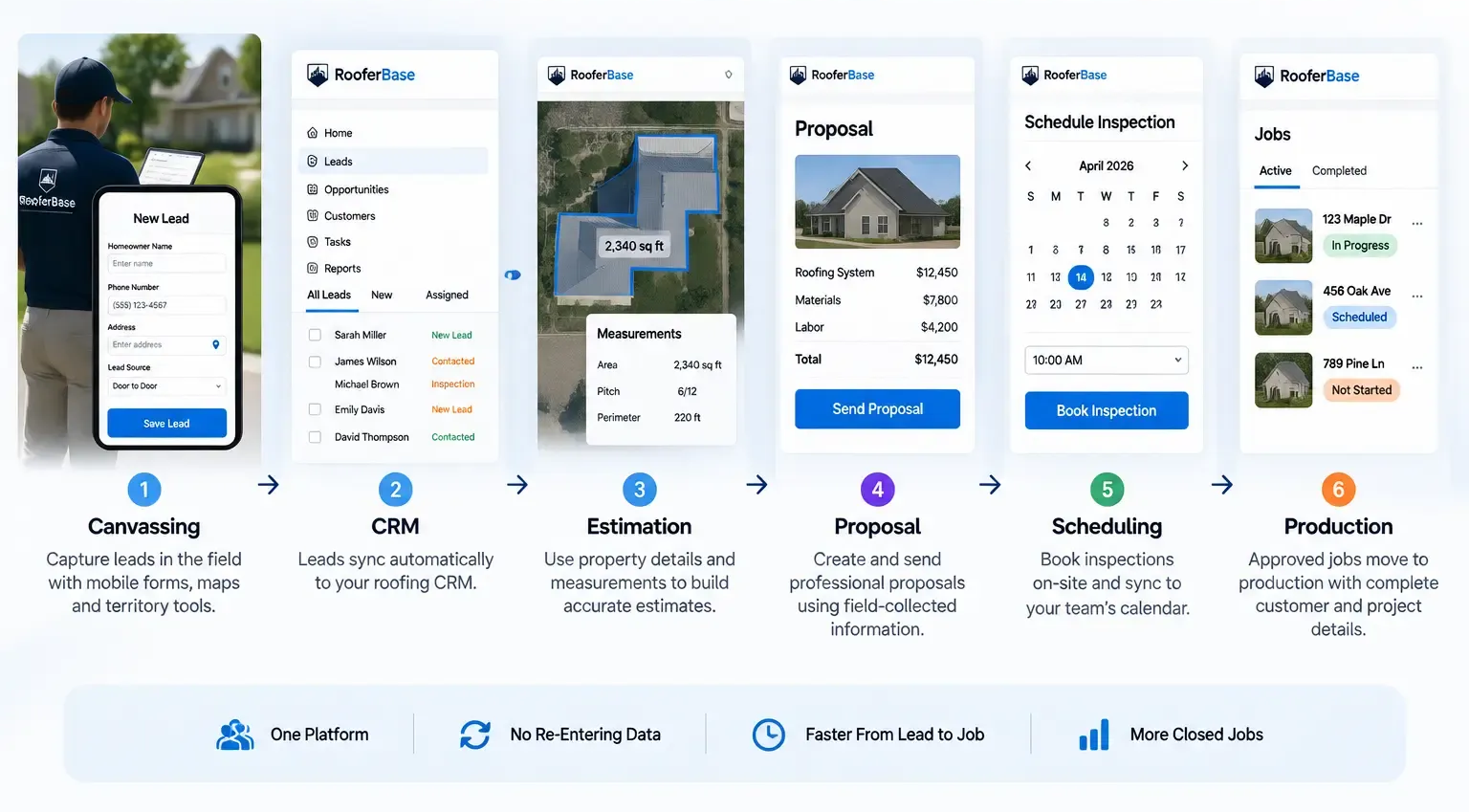
RooferBase doesn't stop at lead capture. It connects your D2D efforts to the entire sales and production process.
01
02
03
Leads captured in the field
sync automatically to your roofing CRM.
Automated follow-ups keep homeowners engaged until the inspection.
Inspections booked on-site flow into your scheduling system.
04
05
Estimates and proposals
use the information captured at the door.
Production teams
receive complete job details from the initial conversation.
08 - Use Cases
Built for Different Roofing Sales Models
Retail & Replacement Roofing
Manage door-to-door lead generation in residential neighborhoods, track rep activity, and book inspections that convert to replacement jobs.
Commercial Roofing
Coordinate canvassing efforts for commercial districts, track property owner conversations, and manage longer sales cycles with multiple stakeholders.
Storm Restoration Roofing
Target storm-affected areas with territory assignments, capture storm-damaged roof leads, and track restoration opportunities from knock to close.
Multi-Crew Operations
Assign different territories to multiple crews, avoid overlapping visits, and track performance across all field sales teams from one dashboard.
Roofing Canvassing Software vs. Paper Forms and Spreadsheets
| Paper Forms and Manual Tracking | RooferBase Canvassing Software |
|---|---|
| Lead details written on paper and easily lost | Mobile lead capture with instant CRM sync |
| No visibility into rep locations or activity | Real-time canvasser tracking and field activity |
| Duplicate visits and missed properties | Territory assignments and visit history |
| Manual follow-up depends on memory | Automated follow-up sequences after door knocks |
| Appointment booking requires separate calls | On-site appointment booking with reminders |
| Performance tracked manually or not at all | Automated performance tracking and leaderboards |
| Coverage visibility limited or non-existent | Territory coverage and gap analysis |