

Roofing Appointment Scheduling Software for Inspections, Estimates, & Sales Visits
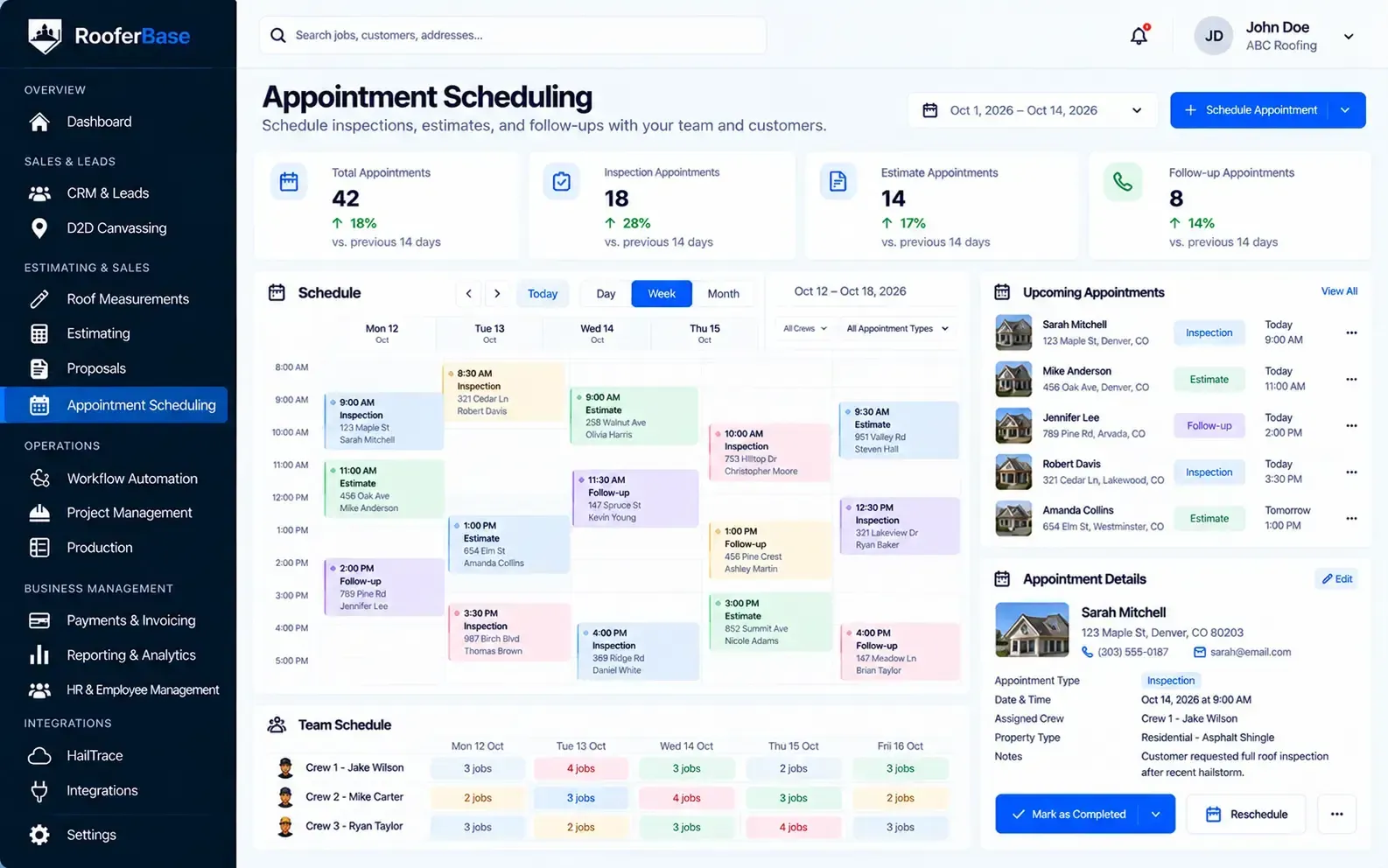

Let homeowners book roofing appointments online, automate reminders and confirmations, sync calendars, and keep sales reps, estimators, and crews aligned from first lead to completed visit.
RooferBase connects appointment scheduling with your CRM, estimation, and proposal workflows so your team always knows which appointments are upcoming, completed, or require follow-up.
Plans from $63/user/month, subject to confirmation that this pricing applies to the scheduling module.
Schedule roofing appointments with:
01
02
03
04
05
06
Online self-scheduling for inspections, estimates, and sales visits.
Configurable appointment slots and availability rules.
Automated SMS and email reminders and confirmations.
Calendar synchronization for sales reps, estimators, and crews.
Easy rescheduling and cancellation options.
Mobile-friendly appointment management for office and field tea
02 - Definition
What Is Roofing Appointment Scheduling Software?
Roofing appointment scheduling software is a digital platform that helps contractors book, manage, confirm, and track roofing appointments such as inspections, estimates, sales visits, and field appointments.
It organizes availability, time slots, reminders, calendar synchronization, and team assignments in one scheduling workflow.
03 - Depth of the appointment
Why Roofing Companies Need More Than a Shared Calendar
A shared calendar can show when an appointment is scheduled, but it does not provide the full context required to manage roofing appointments effectively.
Roofing teams also need to coordinate:
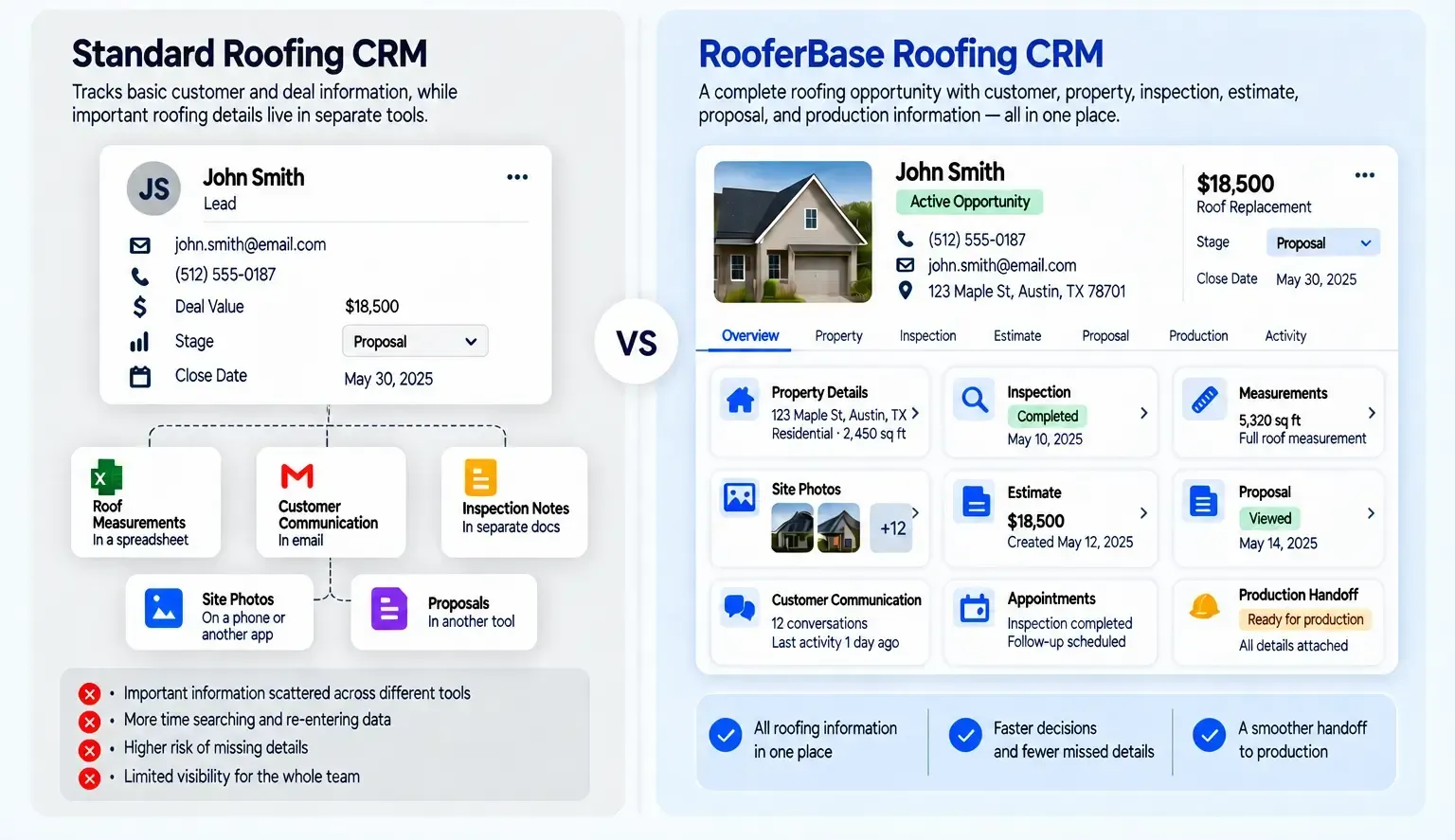
When these details are spread across calls, texts, email threads, and separate calendars, teams may miss appointments, double-book time slots, or lose follow-up opportunities.
Roofing appointment in RooferBase:
01
02
03
04
05
06
07
08
09
10
Appointment type (inspection, estimate, sales visit, crew visit).
Customer and property details.
Lead source and opportunity status.
Sales rep, estimator, or crew assignment.
Territory or location coverage.
Availability and time-slot rules.
Reminders and confirmations.
Rescheduling and cancellations.
Follow-up tasks after the appointment.
Connection to CRM, estimation, and proposal workflows.

04 - Complete Roofing Appointment Workflow
From Lead Request to Completed Appointment
01
02
03
04
05
06
07
Capture the booking request
Receive an appointment request from a website form, phone call, text message, ad, referral, or field representative.
Match availability
Check available time slots for sales reps, estimators, inspectors, or crews based on schedule availability and territory coverage.
Confirm the appointment
Schedule the roofing inspection, estimate, or sales visit and automatically send confirmation details to the homeowner.
Send reminders
Trigger SMS and email reminders before the appointment to reduce missed visits and last-minute cancellations.
Keep the team updated
Sync appointment updates with calendars, sales reps, estimators, crews, and CRM customer records.
Complete the appointment
Record whether the appointment was completed, rescheduled, or missed, and update the relevant customer and opportunity record.
Follow up after the visit
Automate follow-up reminders for estimates, proposals, or next steps based on the appointment outcome.
05 - Core Scheduling Capabilities
What You Can Manage With RooferBase
RooferBase gives your team a structured record for every roofing opportunity, whether it comes from a website form, referral, phone call, advertisement, or field representative.
Your team can:
01
02
03
04
05
06
07
08
09
Online Appointment Booking
Allow homeowners to schedule inspections, estimates, and sales visits based on configured availability.
Appointment Types
Organize inspections, estimates, sales visits, crew visits, and other appointment categories.
Availability and Time Slots
Define working hours, appointment durations, buffers, and booking rules.
Automated Reminders
Send SMS and email reminders and confirmations before scheduled appointments.
Calendar Synchronization
Sync appointments with sales reps, estimators, crews, and other calendars where supported.
Rescheduling and Cancellations
Allow customers and teams to reschedule or cancel appointments according to configured rules.
Sales and Crew Assignment
Assign appointments to the appropriate sales rep, estimator, inspector, or crew.
Mobile Scheduling Access
View and manage appointments from mobile devices where supported.
Follow-Up Automation
Trigger follow-up tasks and reminders after completed, missed, or rescheduled appointments.
A complete customer record helps sales representatives act faster and gives managers a reliable view of pipeline activity.
06 - Online Booking and Self-Scheduling
Let Homeowners Book Roofing Appointments Faster
Online self-scheduling reduces back-and-forth calls and helps roofing teams book inspections and estimates more quickly.
RooferBase helps teams:
- Embed a scheduling widget on the website or landing pages.
- Offer self-scheduling via SMS or email links.
- Define appointment types such as inspection, estimate, or sales visit.
- Set available time slots and booking rules.
- Require customer information and service details.
- Prevent double bookings through real-time availability.
- Show upcoming appointments to sales and field teams.
Operational outcome
Homeowners can book appointments without waiting for a callback, while office teams spend less time manually coordinating time slots.
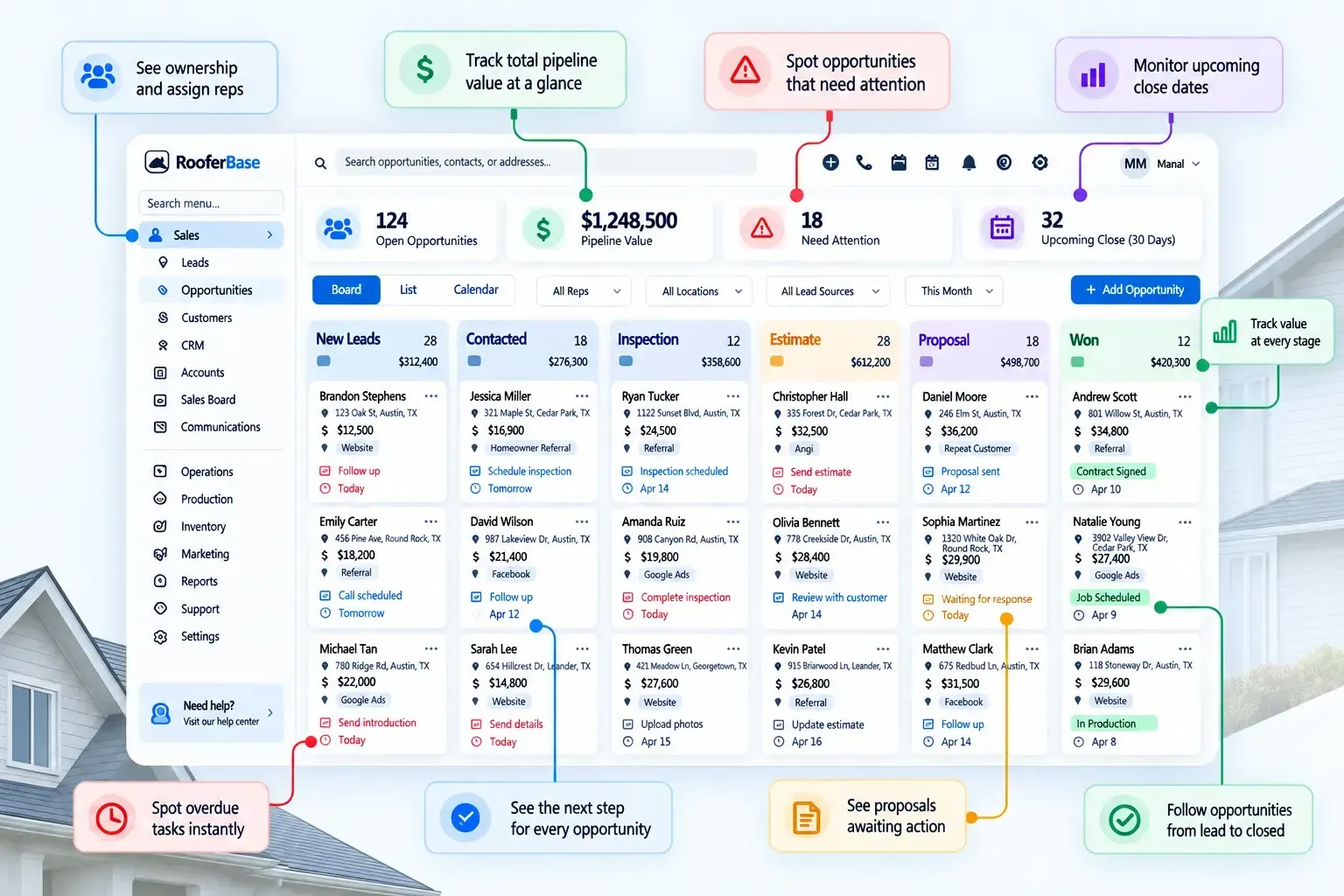
07 - How do Roofers know where every opportunity stands
Reduce Missed Roofing Appointments Before They Happen
Missed inspections and estimates cost roofing companies time and revenue. Automated reminders help customers remember upcoming appointments and give teams a way to handle changes before the visit.
RooferBase helps teams:
01
02
03
Send appointment confirmations when the appointment is booked.
Allow customers to confirm, reschedule, or cancel through the reminder.
Record no-shows and reschedules in the appointment history.
04
05
06
Trigger SMS and email reminders before the appointment.
Notify sales reps, estimators, or crews about upcoming appointments.
Use appointment outcomes to trigger follow-up tasks.
Operational outcome: Fewer missed appointments, clearer visibility into scheduled visits, and more consistent follow-up after inspections and estimates.
08 - Calendar Sync and Team Coordination
Keep Roofing Appointments Connected to the Right Team
Roofing appointments involve multiple people: sales reps, estimators, inspectors, crews, and office staff. Calendar synchronization helps ensure everyone works from the same schedule.
Where roofing opportunities can fall through:
01
02
03
Sync appointments with supported calendars.
Assign appointments based on availability and territory.
Notify relevant users about schedule changes.
04
05
06
View appointments by rep, estimator, crew, or location.
Update calendars when appointments are rescheduled or canceled.
Keep appointment information connected to the CRM record.
Operational outcome:
Office and field teams can coordinate appointments without relying on separate calendars, calls, or text threads.
09 - Rescheduling, Cancellations, and Follow-Ups
Manage Appointment Changes Without Losing Momentum
Roofing appointments often change because of weather, customer availability, crew capacity, or site conditions.
RooferBase helps teams:
- Allow customers to reschedule or cancel through a booking link or reminder.
- Update the appointment and notify relevant users.
- Record the reason for rescheduling or cancellation.
- Trigger new reminders for the updated appointment time.
- Create follow-up tasks after missed or canceled appointments.
- Keep appointment history connected to the customer and opportunity.
Operational outcome:
Appointment changes remain visible and organized, and follow-up actions are not lost when schedules shift.
10 - Appointment Types and Use Cases
Built for Different Roofing Appointment Requirements
Inspection appointments
Schedule roof inspections, damage assessments, and site visits with clear time slots and assignment rules.
Estimate appointments
Book on-site or virtual estimate visits where the sales rep or estimator reviews the property and prepares pricing.
Sales visit appointments
Coordinate sales presentations, proposal reviews, and customer meetings.
Crew and field appointments
Assign crews to site visits, measurements, repairs, or other field activities where supported.
11 - RooferBase vs. Manual Scheduling and Shared Calendars
A CRM for Different Roofing Business Operations
| Manual scheduling and shared calendars | RooferBase Appointment Scheduling |
|---|---|
| Appointment details scattered across calls and messages | Appointment information connected to the customer record |
| Double bookings and overlapping time slots | Configurable availability and booking rules |
| Reminders sent manually or forgotten | Automated SMS and email reminders |
| Rescheduling requires multiple messages | Customer self-service rescheduling and cancellations |
| Follow-ups depend on individual memory | Automated follow-up tasks after appointments |
| Field teams may not see schedule changes | Calendar sync and notifications for relevant users |
| Appointment outcomes not tracked consistently | Completed, missed, and rescheduled status recorded |
FAQs
Ready to
Book More
Roofing Appointments?
Let homeowners schedule inspections and estimates online, automate reminders, sync calendars, and keep sales reps, estimators, and crews aligned from first lead to completed visit.