

Roofing Estimating Software for
Accurate Job Pricing and Faster Bids
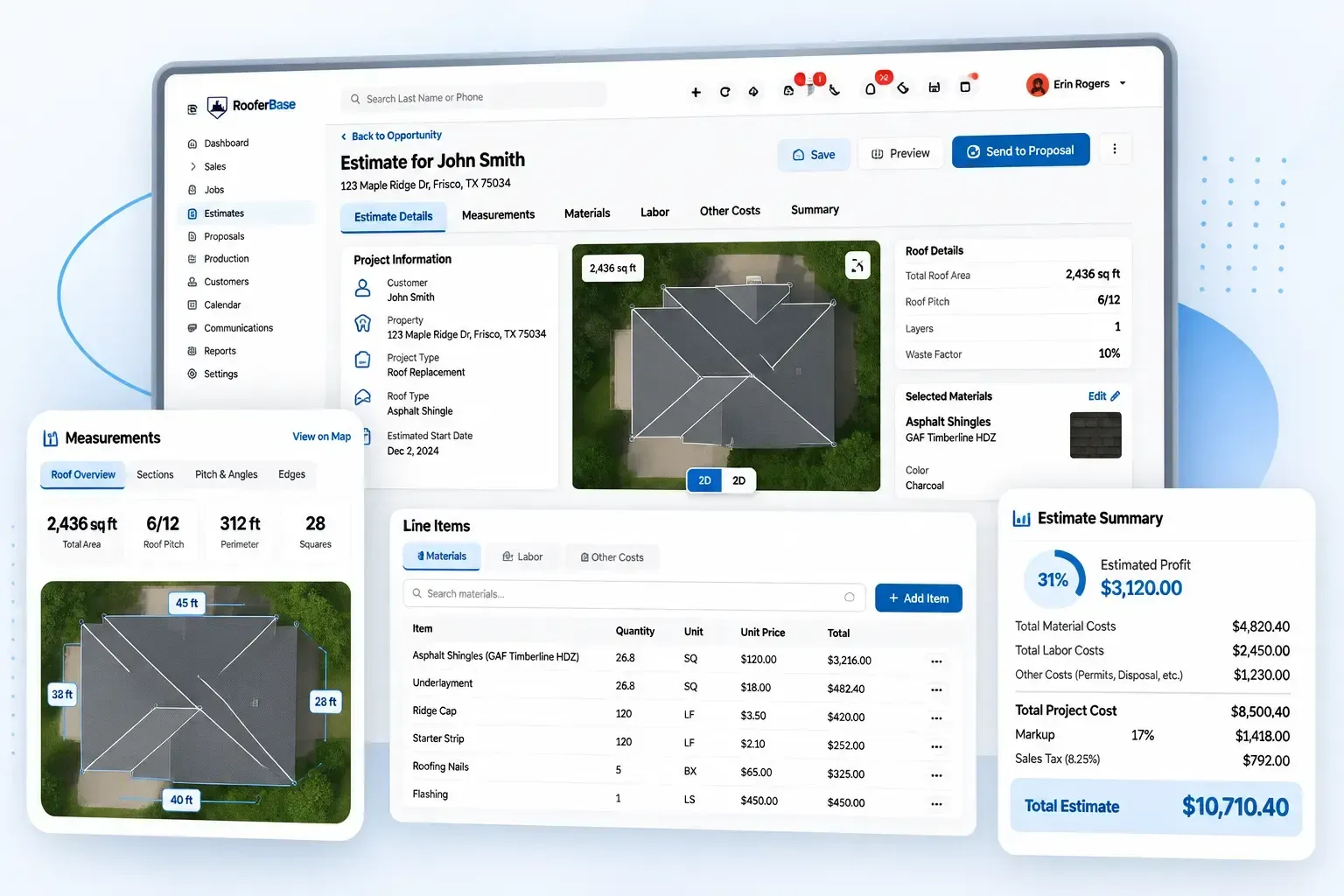

Create accurate roofing estimates, automate material and labor calculations, and protect profit margins from measurement through final pricing.
RooferBase helps roofing contractors standardize job pricing, account for project-specific costs, and create estimates without rebuilding calculations from scattered spreadsheets and notes.
Roofing estimating software:
01
02
03
04
05
06
Automated material, labor, tax, overhead, and waste calculations
Markup and profit margin controls
Measurement data for roof size, pitch, and material requirements
Pre-built and custom estimate templates
Mobile estimate creation and updates
Connected estimate-to-proposal, scheduling, and production workflows
02 - Definition
What Is Roofing Estimation Software?
Roofing estimation software helps contractors turn roof measurements, project scope, material requirements, labor, waste, overhead, taxes, and markup into a structured project price. It standardizes the estimating process so teams can build consistent estimates, review margins, and move pricing into the next stage of the sales and production workflow.
03 - Estimating inputs
Why Roofing Contractors Need More Than a Spreadsheet
Roofing estimates are rarely as simple as multiplying roof area by a material price.
A realistic job price can depend on roof type, pitch, access, tear-off requirements, waste, materials, labor, disposal, permits, overhead, markup, taxes, and additional work. When those inputs are spread across spreadsheets and manual calculations, even a small scope change can affect the final price.
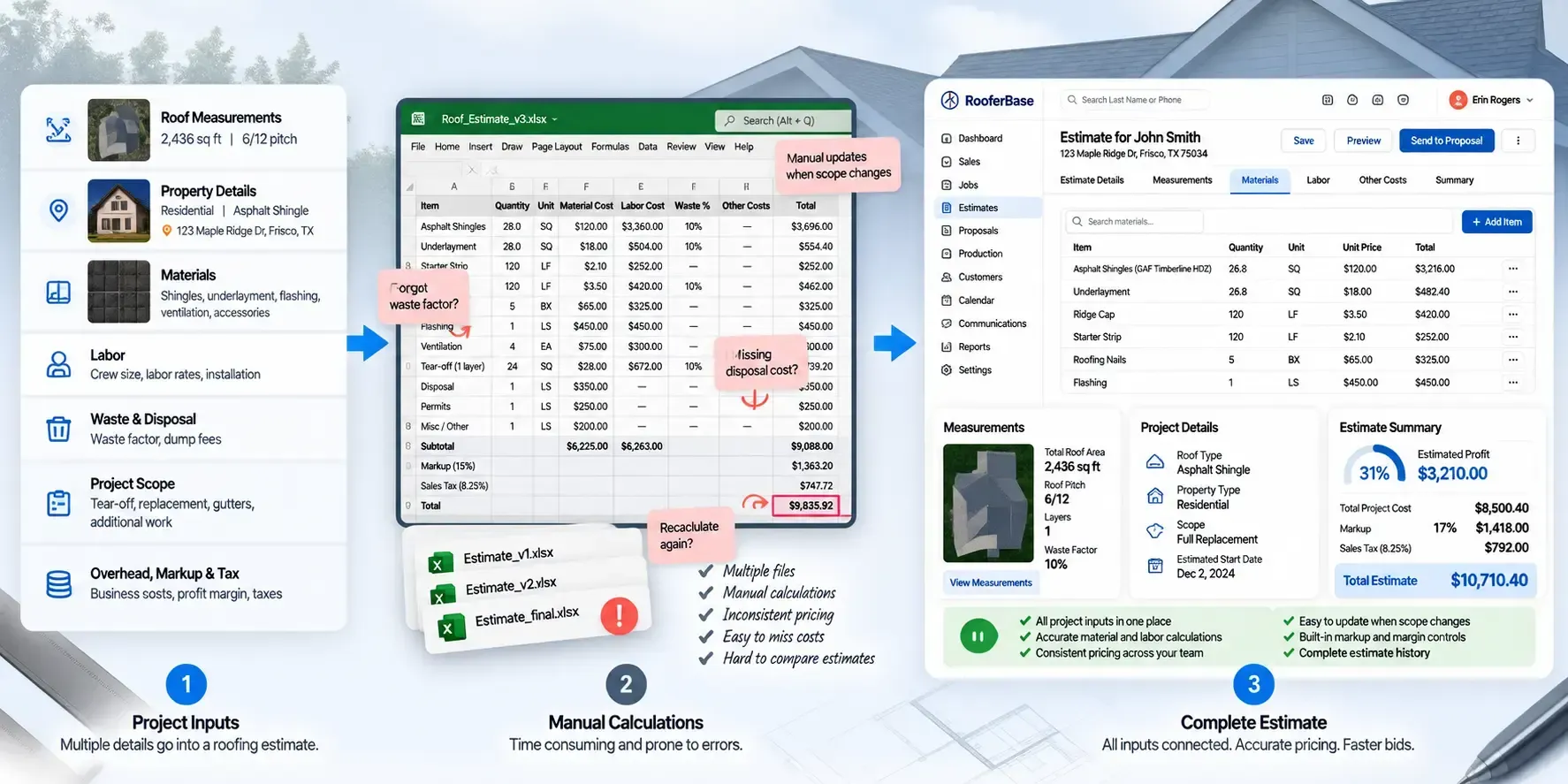
Manual estimating can lead to:
01
02
03
04
05
06
07
08
Inconsistent material quantities
Forgotten or incorrectly applied waste factors
Missed labor, disposal, or overhead costs
Different markups between sales representatives
Repeated recalculation when scope changes
Outdated material or supplier pricing
Additional work missing from the final estimate
Delays between inspection and customer pricing
RooferBase organizes these inputs into a repeatable estimating workflow so contractors can review project costs before sending pricing to the customer.

04 - Complete Estimation Workflow
From Roof Measurements to a Complete Project Estimate
Create accurate roofing estimates, automate material and labor calculations, and protect profit margins from measurement through final pricing.
01
02
03
04
05
06
07
08
09
Start with the project
Open the relevant roofing opportunity or project and review the customer, property, and job information already available.
Add or import measurements
Enter roof dimensions or bring in supported measurement data, then review the quantities before using them to build the estimate.
Define the scope
Specify the work included, such as replacement, repair, tear-off, underlayment, flashing, ventilation, gutters, or other services.
Select materials
Choose the relevant roofing system, material type, accessories, labor requirements, and project conditions that affect pricing.
Calculate material costs
Estimate shingles, metal panels, flat roofing materials, accessories, underlayment, and waste factors based on the project.
Add Labor, Overhead & Other Costs
Include crew labor, taxes, overhead, dump fees, equipment costs, permits, and other job-specific expenses in the estimate.
Review the estimate
Check quantities, pricing, margin, scope, exclusions, and project-specific costs before finalizing the estimate.
Send estimate details to proposal
Use the completed estimate as the pricing foundation for a customer-facing proposal.
Move the approved job forward
Once the proposal is approved, connect the relevant project information with the next stage of the roofing workflow.

05 - Turn Measurements and Job Details Into a Structured Estimate
Build Estimates From Real Roofing Project Inputs
RooferBase Roofing Estimation Software brings the information needed to price a roofing project into one estimating workspace. Estimators can review the property, roof details, project scope, selected materials, labor requirements, and other cost inputs before preparing the final estimate.
RooferBase helps your team:
- Start from an existing customer, opportunity, inspection, or project record.
- Add roof measurements and project dimensions from supported sources.
- Define roof type, materials, scope, and project conditions.
- Separate replacement, repair, tear-off, installation, and additional work.
- Add labor, materials, disposal, accessories, and service line items.
- Include gutters, skylights, ventilation, flashing, repairs, and upgrades where applicable.
- Review estimate inputs before finalizing project pricing.
Estimators work from the project information already collected instead of rebuilding the job from scattered notes, emails, photos, and spreadsheets.
06 - Price the Complete Roofing Job - not Just the Roof Area
Calculate Material, Labor, and Project Costs
A roofing estimate needs to account for more than square footage. RooferBase organizes the cost elements that influence the project price and expected margin.
RooferBase helps teams:
01
02
03
04
05
Material quantities and unit costs.
Tear-off, disposal, delivery, and equipment costs.
Overhead and operating costs.
Taxes, fees, discounts, and adjustments.
Project-specific cost changes.
06
07
08
09
10
Labor rates and installation requirements.
Waste factors for applicable materials.
Markups and project margins.
Optional services and upgrades.
Estimated total and customer-facing price.
Estimators can review and adjust project-specific inputs before finalizing the estimate.
A complete cost structure helps contractors avoid underpricing work, forgetting project expenses, or applying inconsistent markups between representatives and locations.
07 - Profit margins
Protect Profit Margins on Every Roofing Estimate
Roofing costs can change with material prices, labor requirements, roof complexity, access, waste, overhead, and other project conditions.
RooferBase brings these inputs into the estimating workflow, so your team can adjust pricing while keeping markup and target margins in view.
- Adjust material and labor costs
- Apply waste factors
- Account for overhead and project expenses
- Set markup and target profit margins
- Apply discounts and financing details
- Adjust pricing for complexity, height, and accessibility
- Review the final price before sending the estimate
08 -Create Roofing Project Pricing
Connect Roof Measurements With Project Pricing
Roof measurement data gives contractors the dimensions, pitch, and quantities needed to build an estimate.
RooferBase brings supported measurement data into the estimating workflow so teams can use those inputs to calculate material requirements, account for waste, and build project pricing.
Use measurement data to:
- Bring in roof measurements from supported aerial or digital measurement sources.
- Use roof dimensions and pitch to determine material requirements.
- Account for material waste when building the estimate.
- Review measurement information before finalizing project pricing.
- Reduce manual measurement and calculation work between measurement and estimating.
09 - Turn Estimate Details Into a Customer Proposal
Estimate-to-Proposal Handoff
Once the estimate is reviewed, RooferBase carries the relevant project, scope, and pricing information into the proposal workflow. This gives your team a structured pricing foundation for the customer-facing proposal without rebuilding the estimate manually.
The handoff includes:
- Customer and project information.
- Scope of work and project requirements.
- Material and labor pricing.
- Optional services or upgrades.
- Estimate totals and pricing details.
10 - CRM and Production Connections
Keep Estimating Connected to the Wider Roofing Workflow
RooferBase connects estimating with the customer, measurement, proposal, scheduling, production, and financial workflows around the job. Instead of rebuilding project information at each stage, teams can carry relevant estimate details forward as the job progresses.
01
02
03
04
05
CRM
Measurement
Proposal
Production
Accounting
Customer, property, opportunity, and sales information that provides context for the estimate.
Roof dimensions, pitch, quantities, and other supported measurement data used as estimating inputs.
Estimate scope, pricing, options, and project details used to prepare the customer-facing proposal.
Approved project scope and pricing information needed for downstream scheduling and production workflows.
Relevant financial and invoicing information carried into connected financial workflows, where supported.
11 - In practice
How Roofing Contractors Use Estimation Software
Residential replacement
The estimator reviews the property and measurements, selects the roofing system, adds tear-off and installation costs, applies waste and markup, and sends the completed pricing into a customer proposal.
Repair with additional work
The contractor estimates the primary repair, then adds flashing, ventilation, gutters, or other related services as separate scope items.
Material change
The customer selects a different material. The estimator updates the material, quantity, labor, and pricing inputs and generates a revised estimate.
Commercial project
The team creates an estimate involving multiple roof sections, materials, labor conditions, documents, and project requirements.
12 - Estimating comparison
RooferBase Roofing Estimation Software vs. Traditional Estimating Methods
| Estimating requirement | RooferBase | Traditional estimating methods |
|---|---|---|
| Project inputs | Bring customer, roof, measurement, scope, and project details into a structured estimating workflow. | Information is often spread across spreadsheets, notes, emails, and separate measurement tools. |
| Material & labor costs | Organize material pricing, labor, overhead, taxes, and other project costs within the estimate. | Costs are often maintained and calculated manually across separate worksheets or templates. |
| Waste & project conditions | Account for waste, roof complexity, access, height, and other project-specific factors. | Adjustments may require separate calculations and manual updates. |
| Markup & margins | Review markup, discounts, financing details, and target profit margins before finalizing pricing. | Margin calculations may be handled separately or inconsistently between estimators. |
| Estimate templates | Use pre-built and custom estimate templates to standardize how your team builds estimates. | Each estimator may rely on their own spreadsheet, format, or pricing process. |
| Scope & additional work | Include repairs, gutters, ventilation, skylights, upgrades, and other applicable services in the estimate. | Additional work can require separate calculations or be missed during manual estimating. |
| Estimate revisions | Update project inputs and pricing as scope or project conditions change. | Changes can require repeated manual recalculation across worksheets. |
| Estimate handoff | Move estimate details into proposal, scheduling, production, invoicing, or related workflows. | Pricing may need to be manually transferred between disconnected tools. |